Conference room audio testing tool
Know if your room is helping or hurting your meetings.
Stop guessing which rooms need acoustic treatment. RoomScore gives facilities and AV teams professional-grade audit data in minutes using just your phone.
Available on the App Store in the U.S. and Canada only.
Start with the conference room audio testing tool, go deeper with the RT60 measurement app for iPhone, or standardize rollouts with facilities room audit software.

I built RoomScore to stop teams wasting money on hardware that doesn't fix the actual problem.
Ryan, Founder
Scan. Score. Act.
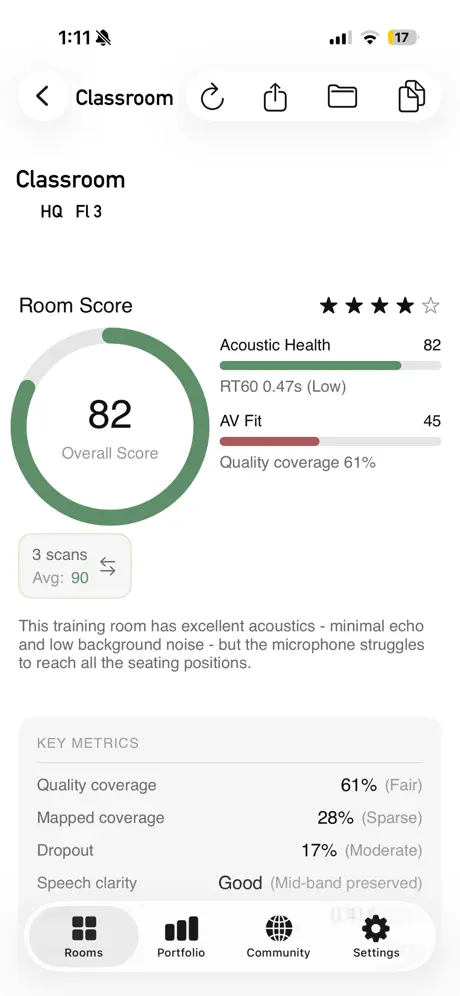
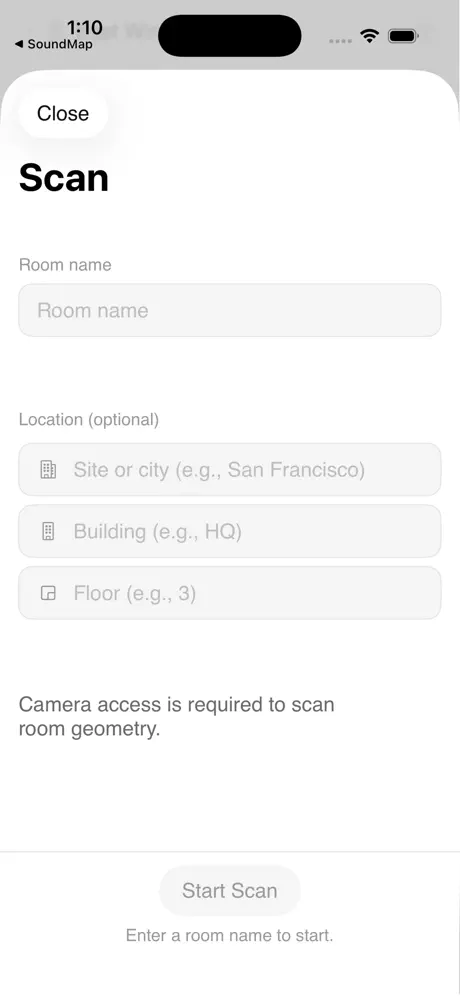
Scan the room, capture the setup.
A guided intake captures room name, location, geometry, photos, and the environmental signals needed for a consistent baseline.
- RoomPlan geometry, required photos, and room metadata are collected in one repeatable workflow.
- Noise and echo checks validate the room before RoomScore turns the scan into a result.
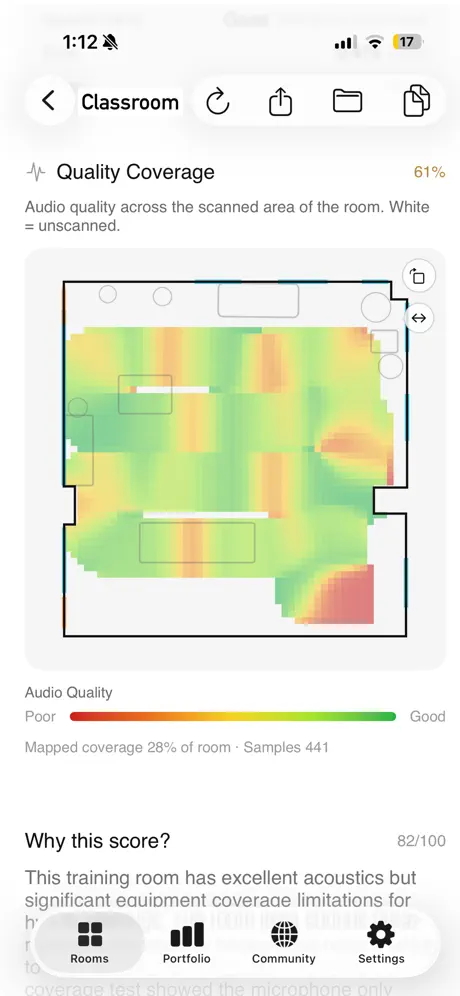
Audio Coverage Mapping
See exactly where audio drops off. RoomScore turns a room walk into a heatmap that shows where remote callers can hear you clearly and where the system fails.
- Visual proof that the mic reaches the back row, or evidence that it does not.
- Coverage maps justify upgrades before money is spent on the wrong fix.
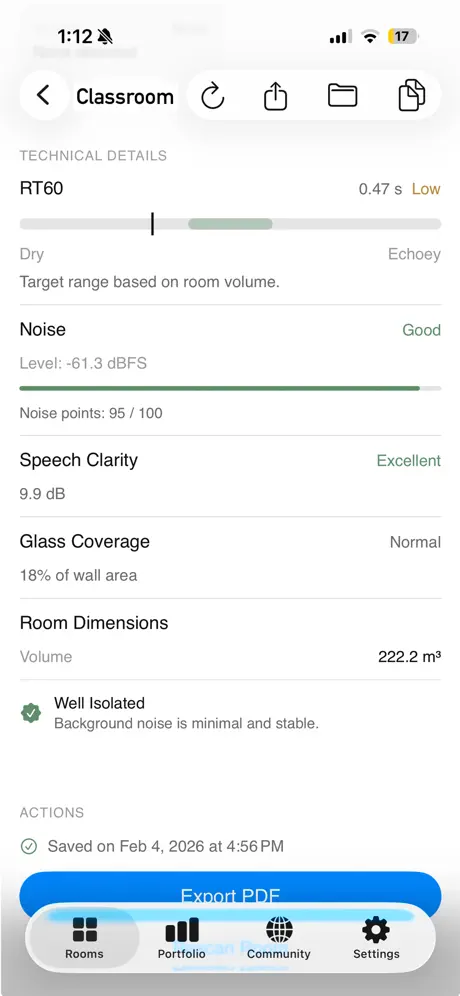
Scientific metrics, simplified.
Get the precise RT60 and noise floor data you need without an acoustics degree. RoomScore translates technical measurements into a professional baseline your team can use immediately.
Translation: echo clears fast enough for clear, professional-grade calls.
Turn the score into a plan.
RoomScore keeps the measured physics immutable, then turns them into prioritized actions, budget scenarios, and clear next steps.
Balanced upgrades that lift clarity and conferencing coverage without overbuilding.
Quick wins with minimal spend.
Flagship-ready upgrades with full treatment and enterprise AV.
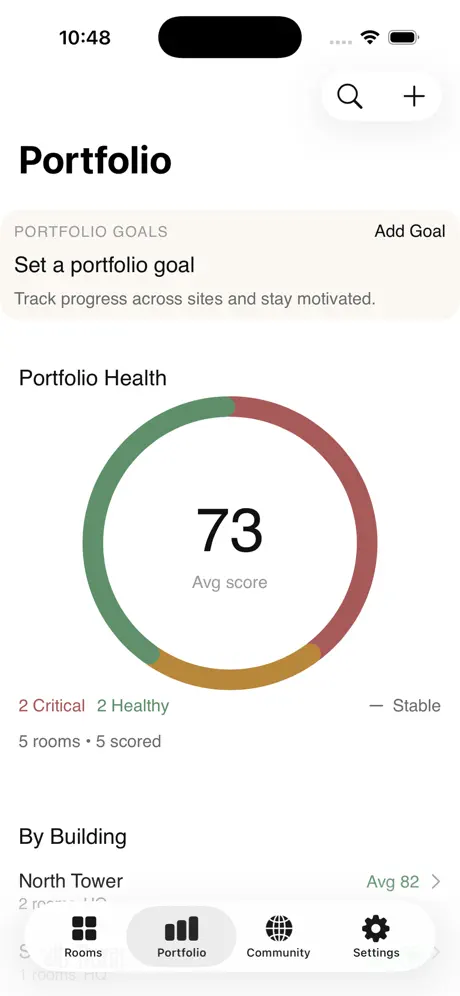
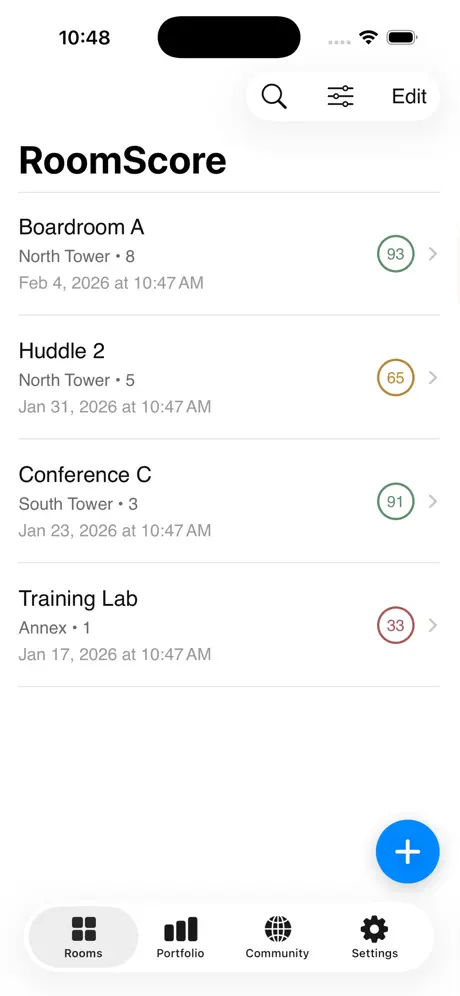
See the rooms that need attention first.
Track completion by site, spot rooms trending down, and understand your average score across the portfolio without opening a spreadsheet.
- Portfolio health shows where your room estate is stable, slipping, or already critical.
- The room list becomes the action queue for what to scan next and what to fix first.
Portfolio trend
See how your rooms compare.
Benchmark your facility against global averages using our anonymized live dataset.
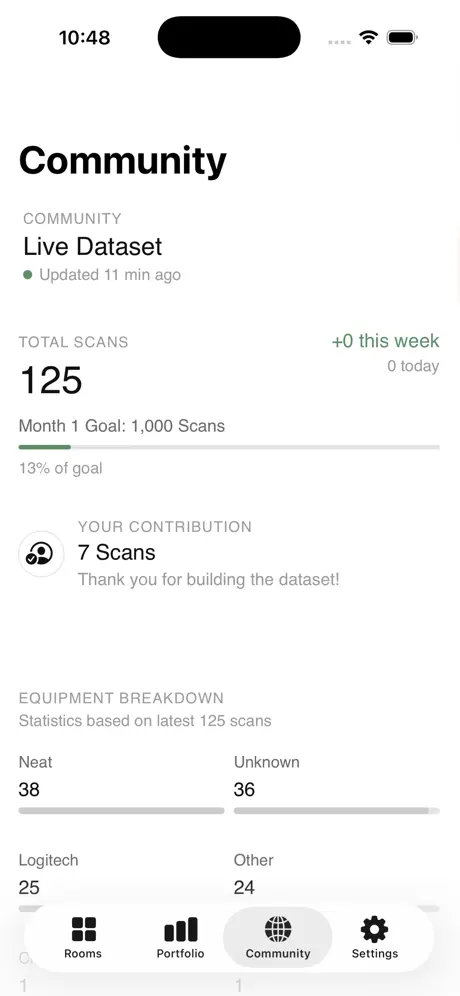
Live Dataset
See fresh community progress, contribution totals, and the benchmark base your rooms are being compared against.
Track how rooms improve over time.
Measure again after treatment, compare against peer spaces, and show whether changes moved the score in the right direction.
Benchmark pulse
Benchmarking without exposing room details.
Anonymous measurements build the dataset while room names, location details, and sensitive context stay out of the shared benchmark layer.
Accurate. Private. Professional.
RoomScore processes acoustic measurements locally on-device so sensitive meeting-room conversations are not transmitted or stored in the cloud. IT and AV teams get defensible room data without sacrificing privacy.
Phone-based measurement, with professional discipline.
RoomScore uses industry-standard acoustic physics, then enforces strict quality gates. The app would rather reject a scan than show a weak score.
Method (physics-first)
RT60 is computed from the -5 dB to -25 dB decay window, then extrapolated to full decay.
Three captures per room, median value reported to reduce variance.
Removes low-frequency HVAC rumble to focus on speech-band energy.
Clarity index is computed alongside RT60 for intelligibility context.
Quality gates (auto reject)
Measurements with R2 below 0.75 are rejected.
Ambient noise spread must stay within 24 dB, with a quiet window within 18 dB.
Gyroscope + accelerometer detect movement and prompt a retry.
Overloaded microphone signals are rejected before scoring.
Screening-grade, not certification.
RoomScore is validated in internal testing against reference tools and is designed for portfolio screening, prioritization, and budgeting. For certification or compliance work, use calibrated Class 1 meters.
What unlocks as benchmarks grow.
RoomScore works offline from day one. Community features unlock as scan milestones are reached.
Benchmark growth milestones
Core measurement + scoring
Echo, noise floor, speech clarity, equipment fit, AI-assisted recommendations, PDF export, community score statistics, equipment performance rankings. Works offline.
Zoom Rooms import
Connect your Zoom account to import rooms, sites, and equipment. Start scans directly from your Zoom Rooms inventory.
Auto-dial coverage testing
Dial your Zoom Room into a test call automatically. Walk the room while RoomScore captures real call quality from the room's AV system.
Outcome and spatial research
Longitudinal insights and treatment outcome validation.
Conference room audio, explained.
Short, practical guides on echo, RT60, noise floor, and coverage testing.
Need the workflow instead of the guide? Start with the conference room audio testing tool, the RT60 measurement app for iPhone, or facilities room audit software.
Conference call audio problems
Symptoms, root causes, and fast checks.
EchoWhy does my conference room echo?
How reflections and materials drive echo.
RT60What is RT60?
Reverberation time, measured simply.
NoiseMeeting room noise floor
Background noise and speech clarity.
TestingHow to test conference room audio
Quick checks vs. full measurements.
CoverageAudio coverage mapping
See how well voices carry across the room.
ZoomZoom Rooms + RoomScore
Connect inventory and test coverage.
Why contribute early?
The faster benchmarks grow, the faster your rooms gain context.
Milestones unlocked by contribution
At 100 community scans, score statistics unlock. At 500, equipment rankings appear. The sooner you contribute, the sooner your rooms have context.
The first 1,000 scans define what "good" looks like. Your rooms help set the baseline everyone compares against.
We run quarterly surveys with active contributors. You help decide which features to prioritize.
Built-in privacy, no tiers.
- Anonymous measurements: Echo, noise, volume, equipment, and room metrics power benchmarks without identifiers.
- No room identifiers: Names, sites, and buildings stay in your account.
- Photos are required for AI analysis: Deleted from cloud after processing and screened on-device before upload.
Direct support.
Replies come from the founder. RoomScore is live on the App Store in the U.S. and Canada only.
Contact
Questions, support, feedback, ideas, or more info — send a note here. Replies come from the founder.
Typical response time: 1 business day.
What devices are supported?
iPhone 12 Pro or later, or iPad Pro 2020 or later (LiDAR required). iOS/iPadOS 17+ required.
How accurate are the measurements?
RoomScore is designed for guidance and benchmarking, not certification. Measurements are approximate and device-relative; accuracy varies by device, room conditions, and technique. The app runs quality checks and may prompt a retry.
How is RT60 calculated?
RoomScore captures three claps, applies a 150 Hz high-pass filter, fits a T20 decay from -5 dB to -25 dB, and requires an R2 fit of at least 0.75 before reporting the median RT60.
Why trust phone-based measurement?
RoomScore enforces strict quality gates: device stability, clipping detection, and noise stability (overall spread at or below 24 dB, quiet window at or below 18 dB). If a scan fails, the app asks you to retry.
How does RoomScore compare to professional meters?
RoomScore is for fast screening and portfolio prioritization. Class 1 meters are required for certification, compliance, or critical acoustic design work.
What data does RoomScore collect?
RoomScore collects acoustic measurements, room metrics, and equipment info for benchmarks. Room names and location fields stay in your account. Room notes stay in your account and may be used for AI analysis. Environment signals (Wi-Fi, light, barometer, vibration, sound classification) may be included in anonymized research dataset for benchmarking context when captured. Photos are required for AI analysis and deleted from cloud storage after processing (cached locally up to 7 days). See the privacy policy for details.
Is research contribution required?
Yes. Using RoomScore requires contributing anonymized measurements (RT60, noise, room dimensions, equipment categories) to our research dataset. This helps build better benchmarks for everyone. Your measurements persist even if you delete individual scans. Only deleting your entire account removes your contributions (aggregated statistics may remain).
What happens if I delete my account?
All account data (room names, photos, notes, analysis) is deleted within 30 days. Your individual research records are removed from the dataset. Aggregated statistics (e.g., average RT60 across 1,000 rooms) remain for benchmark integrity but cannot identify you.
Can I use this for acoustic certification?
No. RoomScore is for screening and planning. For certification, use calibrated Class 1 equipment and a licensed acoustical engineer.
Will core features stay free?
The plan is to keep core measurement and offline scoring free. Optional paid tiers may add exports, team workflows, or advanced analytics later.
What is the audio coverage map?
The coverage map shows where remote callers can hear you clearly across the room. Walk the room while RoomScore plays reference audio through the speaker system and records through the mic. The result is a color-coded heatmap showing audio quality at every position.
Can I test actual call quality?
Yes. RoomScore can create a test call directly from the app and capture real call quality metrics: MOS score, jitter, packet loss, and latency. Any Zoom-enabled conference room can join the test call.
Ready to trust the score?
Join facilities teams using RoomScore to eliminate audio friction before it hits the calendar.
Start Free Room Audit